Scored on 123 verified owner verdicts, from 1,592 comments read across 4 communities
TL;DR
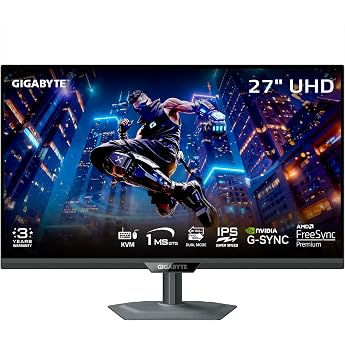
A budget-favorite 4K 144Hz IPS monitor with razor-sharp text, HDMI 2.1 for PS5/Xbox, and a built-in KVM. A go-to for gaming and work; minor knocks are occasional ghosting and a black-screen-on-alt-tab quirk.
77% of 123 verified owners recommend the Gigabyte M28U, based on real owner verdicts aggregated from Reddit, enthusiast forums, and YouTube.
1,592 comments reviewed · scored on the 123 clearest verdicts
77%
Recommend
95 owners
8%
Neutral
10 owners
15%
Don't recommend
18 owners
Source
Breakdown
Score
N
Counted in the score
Reddit
78%
120
Other forums
67%
3
Reviewed, but not counted — and why
YouTubeiOrdinary owner comments (not the reviewer), but here they sit too far from the owner consensus on Reddit and forums — channel comment sections can skew heavily positive or negative by trend — so they're shown for perspective and kept out of the score.owner comments
85%
20
Affiliate blogsiThese blogs earn a commission when you buy. Across our data they rate products ~35 points more positively than actual owners — shown for transparency, never counted in the score.paid commission
50%
2
No clear verdictiGood-to-know notes — setup, tips, and things to watch for. We use them for the pros, cons, and who it's for, but they don't reflect a definitive opinion on the product, so they're never counted in the score. See the 'Good to know' section below the quotes.Setup, tips & quirks
—
11
Affiliate blogs here say 50% recommend, while the owner-based score is 77%. They earn a commission on every sale — so we show them for transparency but never let them move the score.
The headline score reflects owners (Reddit, enthusiast forums), independent lab tests, blogs with no affiliate links, and YouTube owner-comments when they line up with owners. YouTube and Affiliate blogs are shown for perspective but kept out here — hover the i for why.
What owners like
Sharp 4K clarity with crisp text · 16 · 13%
Great value and a strong budget 4K gaming monitor · 13 · 11%
Smooth 144Hz performance, great for gaming · 10 · 8%
Built-in KVM switch for easy switching between devices · 8 · 7%
Works great with consoles (PS5/Xbox) and Macs · 6 · 5%
What owners flag
Poor, fake-feeling HDR · 5 · 4%
Random black-screen resets and display dropouts · 4 · 3%
Who it's for
A great fit if
PS5 and Xbox players wanting 4K at 120Hz
Programmers and creators wanting razor-sharp 4K text
Budget buyers wanting affordable 4K 144Hz
Multi-device users relying on the built-in KVM
Look elsewhere if
Buyers expecting true, high-quality HDR
People needing perfect panel uniformity
Synthesized from what Gigabyte M28U owners say — not a spec sheet.
Retailers' own star averages, for comparison — separate from our vetted owner-verdict score above.
Top quotes, sourced
1,592 reviewed · 145 shown
Sentiment
Community
Sort
Reddit▼ don’t recommend
“The uniformity on that M28U and the 28" panels like it is absolutely terrible. Even rtings' review shows a pink hue on the left side. I'd avoid those.”
Reddit— neutral
“I own the HDR400 screen(M28U), I honestly prefer the HDR mode to a non HDR. Of course it’s a far fetch from actual real HDR, but I still find that mode more vivid and bright.”
YouTube▲ recommend
“Tengo 2 meses con este monitor y es una chulada”
YouTube▲ recommend
“I've been using mine for the last month and I'm loving it.”
Reddit— neutral
“I currently have the gigabyte m28u it's not great but it's decent for the price but I just can't see anything anymore i literally have to use a magnifying glass in some games”
Reddit▼ don’t recommend
“I got M28u since December, and recently I experience horizontal lines for 1 second at least 1x per day.”
YouTube▲ recommend
“I have finally found a monitor that has almost everything I wanted”
Reddit— neutral
“Using a Gigabyte M28U right now for more than a year and it's alright. Got issues with HDR and overall brightness but it got solved eventually. I just don't use its HDR capabilities at all because it isn't real HDR anyway.”
Reddit▼ don’t recommend
“I really regret getting a 4K monitor (it’s an IPS - m28u). It’s just too expensive .”
YouTube▼ don’t recommend
“ya empecé a no confiar en giga porque me han durado muy poco los monitores”
Reddit— neutral
“My gigabyte m28u has been very nice for my series x. The hdr is complete ass but for gaming it's pretty terrific to run 120hz at 4k.”
YouTube▲ recommend
“2 years later with thousands of hours of gaming and uts still great!!!! No problems whatsoever”
Reddit— neutral
“Gigabyte M28U. I know, it's not the best but it works for me.”
YouTube▲ recommend
“I love the KVM feature and built-in speakers, great for a minimalist setup”
YouTube▼ don’t recommend
“me vino mal y me quedé sin él”
YouTube▲ recommend
“It is simply amazing!”
Reddit— neutral
“The pixel density of 4k is awesome. I have the same issue with swapping inputs/leaving full screen. It takes a solid 5/6 seconds of black screen to leave a full screen application which is annoying.”
Reddit▼ don’t recommend
“I bought m28u this year and it has a problem with the screen resetting randomly leaving me with a black screen for around 10-20 seconds which is aweful while gaming. I looked online and it appears to be a common problem (search gigabyte m28u black screen). I tried all suggestions to fix, including buying 4 different HDMI cables which was what gigatech suppor”
YouTube▲ recommend
“I just got it and I love it!”
Reddit▼ don’t recommend
“I had one of these and retuned it. Horrific uniformity. Really bad dirty screen effect and had two bright lines from top to bottom on a white screen. Also, the overshoot at 60fps was intense”
MLB The Show Forums— neutral
“it's a nice display if you're looking for "next gen" features. It's not cheap but more on the budget side of 4K 2.1 monitors. I think I may have spent around $550 or so. My only complaint is that it's not as clear as my LG CX 65" TV.”
Reddit▼ don’t recommend
“M28u was the worst one out of the 4 I've tried. 4 stuck pixels, horrible color and it would randomly reboot back to it's splash screen for 5 to 10 seconds while gaming.”
Reddit▲ recommend
“I’ve been using the Gigabyte M28U since PS5 launched and its pretty good for its price right now”
Reddit— neutral
“have the m28u, and this is what i've been doing for the last year - "terrible" is hyperbole,as usual”
Practical notes owners raise — setup, quirks, and issues to watch for. They don't say whether the person likes the product, so they're not counted in the score, but they inform the pros, cons, and who it's for.
Redditⓘ good to know
“even my expensive (for me) Gigabyte M28U has light bleed. During a game or movie I don't really notice it unless I look for it.”
Redditⓘ good to know
“i personally didnt feel a difference but im not a pro gamer in any shape or form. I still make headshots fine in Cod and other shooters personally.”
Redditⓘ good to know
“I eventually settled on an M28U that has slight backlight uniformity issues and a half-dead pixel but it's so tiny it's invisible in normal use.”
Redditⓘ good to know
“well it seems pretty good except one dead pixel on the lower part of the screen. I don't know...I'm still on the fence”
Redditⓘ good to know
“Not sure why gigabyte programmed it that way - the monitor is happy to accept a 4:2:2 signal over DisplayPort.”
Redditⓘ good to know
“Didn't bother with HDR when its only 400 nits brightness and lack of local dimming lol”
Redditⓘ good to know
“It only outputs 18W of power over the USB C which is not enough to charge a laptop”
Redditⓘ good to know
“M28U was my choice too. No dead pixel And yeah some backlight as u describe.”
Redditⓘ good to know
“My M1 MBA appears to support 4k@120Hz using an Anker USB-C 3.1 Gen 2 cable.”
Redditⓘ good to know
“I just got mine and turned HDR off. Looks significantly better.”